Sunday, March 17, 2013
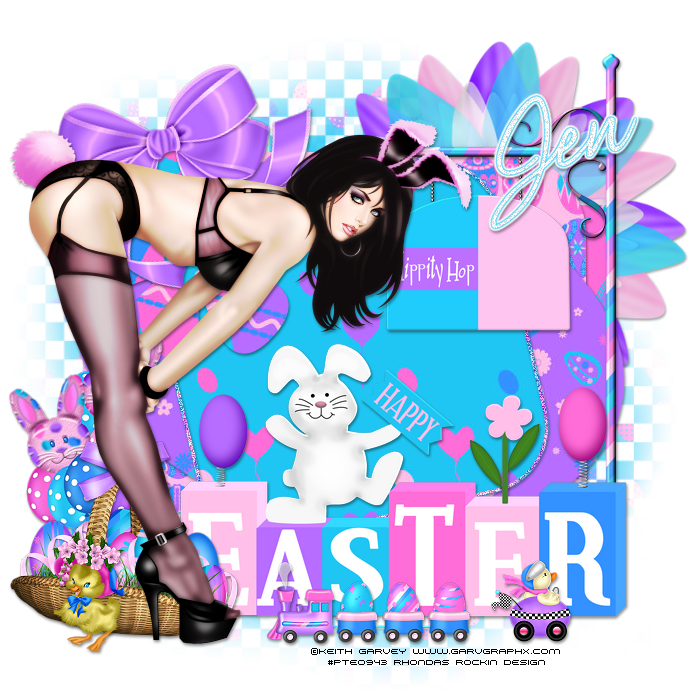
Happy Easter - PTU
Supplies Needed:
Tube of choice: Im using the wonderful art work of Keith Garvey
This tube was purchased at PTE which has closed
You can find his art HERE
PTU Scrap Kit by Jen from Sweet Temptations called "Eggsposed"
You an purchase this awesome kit HERE
Easter Template #4 by Flaminsal HERE
Mask #157 by Vaybs HERE
Don't forget to leave a thank you when downloading
Xero Radiance
Open template - Shift D to duplicate then close out original
delete copyright,wordart & small flower
paste a paper of choice from the kit - I used paper2
selection invert delete
select none delete the original
paste a paper of choice from the kit - I used paper4
selection invert delete
select none delete the original
paste a paper of choice from the kit - I used paper3
selection invert delete
select none delete the original
paste a paper of choice from the kit - I used paper7
selection invert delete
select none delete the original
paste a paper of choice from the kit - I used paper8
selection invert delete
select none delete the original
add noise with settings of choice
paste a paper of choice from the kit - I used paper6
selection invert delete
select none delete the original
apply Xero Radiance with settings fo choice
I used the following:
Balloons
Basket
Bow 1
Duck
Flower 5
Happy Easter
Hippity Hop Sign
Racing Duck
Train
Open paper 1 & apply mask of choice
Add the Copyright and your License Number for the tube
Resize to your liking and save as PNG
This tutorial was created on March 17, 2013 by Rhonda
Any resemblance to another Tag or Tutorial is purely coincidental


Friday, March 15, 2013
Daydreamer - PTU

This tube was purchased at MPT which has closed
You can find his art HERE
PTU Scrap Kit by Jen from Sweet Temptations called "Daydreamer"
You an purchase this awesome kit HERE
Template #40 by Rose HERE
Mask of choice
Don't forget to leave a thank you when downloading
Penta Color Dot
Open template - Shift D to duplicate then close out original
Resize template 115 all layers
Canvas size 650x650
delete copyright & layer 3
paste a paper of choice from the kit - I used paper2
selection invert delete
select none delete the original
Effects/textures/blinds with settings of choice
add a new layer and flood fill with a gradientof choice
select none delete the original
apply Penta color dot with settings of choice
I used the following:
Boombox
Bow 1
Brad 1
Dfly 1
Journal
Paperclip 1,2&3
Skateboard
Teddy
Open paper 10 & apply mask of choice
Add the Copyright and your License Number for the tube
Resize to your liking and save as PNG
This tutorial was created on March 15, 2013 by Rhonda
Any resemblance to another Tag or Tutorial is purely coincidental
Monochrome Beauty - FTU

Supplies Needed:
Tube of choice: Im using the wonderful art work of Jennifer Janesko
This tube was purchased at CIM which has now closed
You can purchase her tubes now at CDO HERE
FTU Scrap Kit by Mizteeque from called "Monochrome"
You can download this awesome kit HERE
FTU cluster by Callie that matches this kit HERE
Look under Monochrome frames
Mask of choice
Xero Radiance
Xero Porcelin
PhotoEffex Scanlines
Ok Lets get Started:
Open cluster frame - shift D and close original
Canvas size 700x700
Open closeup tube and place inside the frame
Erase all the diamonds inside the frame
Apply Xero Porcelin with default settings
Apply PhotoEffex with default settings
Place main tube to right of frame
Apply Xero Radiance with settings of choice
I always place my tube then build around it
Element 1
Element 8
Element 13
Element 18
Element 20
Element 21
Element 29
Element 34
Add mask of choice
Add the Copyright and your License Number for the tube
Resize to your liking and save as PNG
This tutorial was created on March 15,2013 by Rhonda
Any resemblance to another Tag or Tutorial is purely coincidental
Subscribe to:
Posts (Atom)
My Blinkie

My Licenses

