Sunday, November 18, 2012
Winter Thoughts - PTU
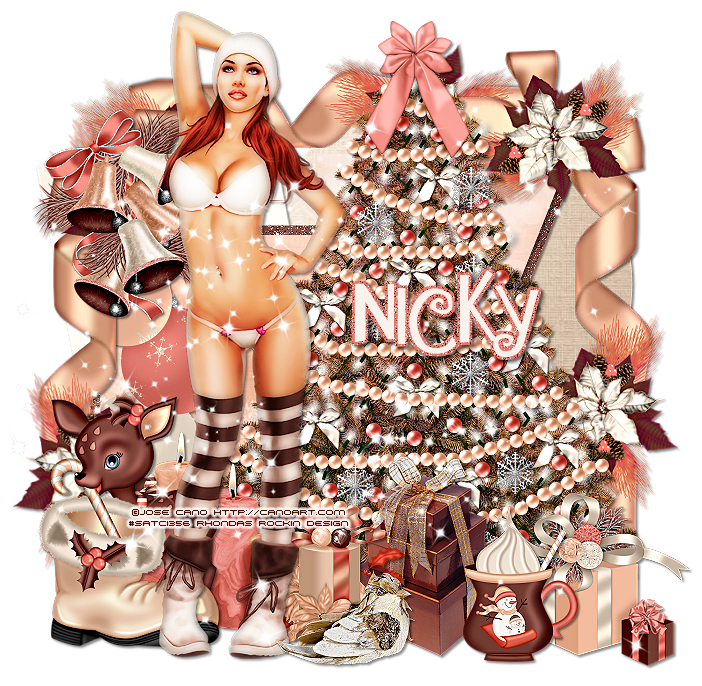
Supplies Needed:
Tube of choice: Im using the wonderful art work of Jose Cano
You can purchase his work at SATC HERE
PTU Scrap Kit by Nicky from Inzpired Creationz called "Pinkish Winter"
You an purchase this awesome kit from SATC HERE
Christmas Template #18 by Leah HERE
Don't forget to leave a thank you when downloading
Plugins Used:
Xero Radiance
Xero Porcelin
Open template - Shift D to duplicate then close out original
Delete copyright,all wordart,square 1,square 1 back & rect 2
paste a paper of choice from the kit - I used paper6
selection invert delete
select none delete the original
paste a paper of choice from the kit - I used paper4
selection invert delete
select none delete the original
paste a paper of choice from the kit - I used paper8
selection invert delete
select none delete the original
paste a paper of choice from the kit - I used paper3
selection invert delete
select none delete the original
paste a paper of choice from the kit - I used paper2
selection invert delete
select none delete the original
paste a paper of choice from the kit - I used paper10
selection invert delete
select none delete the original
add noise
paste a paper of choice from the kit - I used paper3
selection invert delete
select none delete the original
Xero Radiance with settings of choice
Xero Porcelin with settings of choice
I used the following:
Baubles
Bells
Bird
candles
Christmas Tree
Cocoa
Package
Packages 1&2
Reindeer 1
Ribbon 1
Sparkles 2
Add the Copyright and your License Number for the tube
Resize to your liking and save as PNG
This tutorial was created on November 18,2012 by Rhonda
Any resemblance to another Tag or Tutorial is purely coincidental


What's Cooking - PTU

Supplies Needed:
Tube of choice: Im using the wonderful art work of Elias Chatzoudis
You can purchase his work at his store HERE
PTU Scrap Kit by Jen from Sweets Temptations called "Pumpkin Spice"
You an purchase this awesome kit HERE
Thanksgiving Template #111 by Leah
You can get this HERE
Mask of choice
Don't forget to leave a thank you when downloading
Xero Radiance
Filters Unlimited
Open template - Shift D to duplicate then close out original
Resize 110% all layers
Canvas size 700x675
delete top 3 layers
add noise to all the frame layers
paste a paper of choice from the kit - I used paper10
selection invert delete
select none delete the original
paste a paper of choice from the kit - I used paper7
selection invert delete
select none delete the original
add a brown color
apply Filters Unlimited Fine Canvas
select none delete the original
paste a paper of choice from the kit - I used paper2
selection invert delete
select none delete the original
paste a paper of choice from the kit - I used paper9
selection invert delete
select none delete the original
paste a paper of choice from the kit - I used paper6
selection invert delete
select none delete the original
paste a paper of choice from the kit - I used paper1
selection invert delete
select none delete the original
Xero radiance with settings of choice
I used the following:
Bow
Branch
Cake
Candle
Cup
Cupcake 1&3
Jar
Pies
Turkey
Apply mask
Add the Copyright and your License Number for the tube
Resize to your liking and save as PNG
This tutorial was created on November 18,2012 by Rhonda
Any resemblance to another Tag or Tutorial is purely coincidental
Rockitudeness - PTU

Supplies Needed:
Tube of choice: Im using the wonderful art work of Elias Chatzoudis
Which you must obtain a license to use at his store HERE
Scrap Kit By Aurelie from Pink Candy Designs called "Best of Rock"
You an purchase this awesome kit HERE
Template #375 by Missy from Divine Intentionz
You can get this HERE
Don't forget to leave a thank you when downloading
Plugins Used:
Xero Radiance
Eyecandy Gradient Glow
Open template - Shift D to duplicate then close out original
Canvas 710x685
deleted copyright
paste a paper of choice from the kit - I used paper13
selection invert delete
select none delete the original
paste a paper of choice from the kit - I used paper10
selection invert delete
select none delete the original
paste a paper of choice from the kit - I used paper2
selection invert delete
select none delete the original
Add Eyecandy Gradient Glow
paste a paper of choice from the kit - I used paper15
selection invert delete
select none delete the original
paste a paper of choice from the kit - I used paper7
selection invert delete
select none delete the original
paste a paper of choice from the kit - I used paper4
selection invert delete
select none delete the original
Add noise with settings of choice
paste a paper of choice from the kit - I used paper10
selection invert delete
select none delete the original
paste a paper of choice from the kit - I used paper12
selection invert delete
select none delete the original
Add noise with settings of choice
Xero Radiance with settings of choice
I used the following:
Cupcake 2
Guitar
Ipod 1&2
Lollipop 2
Music Notes
Sparkles
Add the Copyright and your License Number for the tube
Resize to your liking and save as PNG
This tutorial was created on November 18, 2012 by Rhonda
Any resemblance to another Tag or Tutorial is purely coincidental
Subscribe to:
Posts (Atom)
My Blinkie

My Licenses

