Sunday, November 25, 2012
North Pole Cutie - FTU

Supplies Needed:
Tube of choice: Im using the wonderful art work of Zlata_M
You can purchase her tubes at PFD HERE
FTU Scrap Kit by Vesta called "Pink Ice Xmas" HERE
Mask of choice
Don't forget to leave a thank you when downloading
Plugins Used:
Xero Radiance
Open cluster frame 1 - paste as a new layer
Grab the freehand tool and draw around 1 frame at a time
Open closeup tube and place inside each frame
Selections invert delete
Apply Xero Radiance with settings of choice
Open element 2 - resize - place at top left of frame
Open element 29 - resize - place at bottom left of frame
Duplicate this element and move behind the frame
Grab the eraser tool and erase all parts showing on top of frame
You want the candle to show behind the frame
Open element 30 - resize and place to bottom right of frame
Open element 37 - resize - place in front of frame to left
Open element 31 - resize - place beside element 37 more to the right
Place your main tube to right of frame
Apply Xero radiance with settings of choice
Merge your layers
Open paper 10 and apply mask of choice
Merge group
Open sparkles 2 - apply on top of mask
Add the Copyright and your License Number for the tube
Resize to your liking and save as PNG
This tutorial was created on November 17,2012 by Rhonda
Any resemblance to another Tag or Tutorial is purely coincidental


Thursday, November 22, 2012
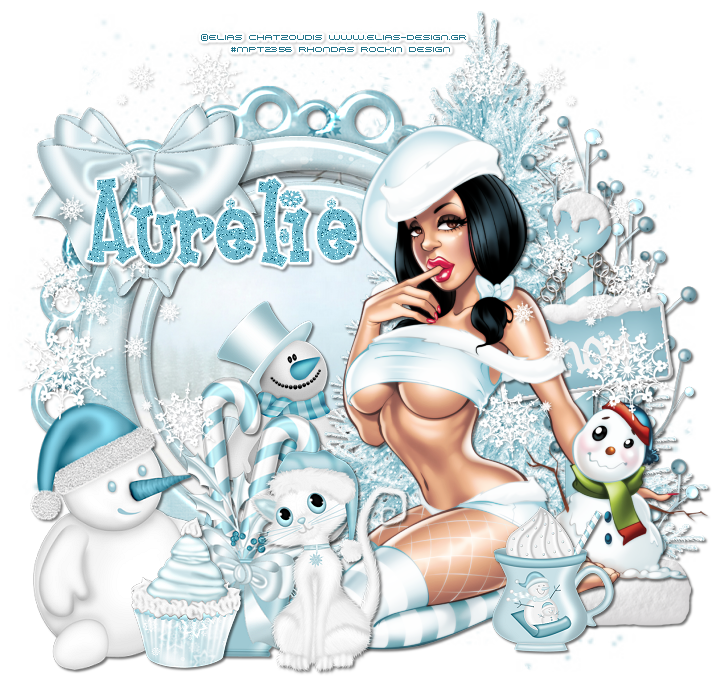
Time for Snow - PTU
Supplies Needed:
Tube of choice: Im using the wonderful art work of Elias Chatzoudis
This tube was purchased at MPT which has now closed
You can now find Elias's work at his own store HERE
PTU Scrap Kit By Aurelie from Pink Candy Designs called "Snowflake"
You an find this awesome kit HERE
Mask of choice
Plugins Used:
Xero Radiance
Open a blank image 715x685
resize by 90%
Open frame 2 from kit and place on top of frame 1
resize this frame by 80%
Grab the magik wand and click inside frame 1
Select modify expand by 6
Open paper 11 from kit and place as a new layer
selections invert - delete
move paper under frame
Dropshadow the elements then merge
Apply Xero Radiance with settings of choice
I used the following:
Berries
Bow
Cupcake
Kitten
Mug
Sign 2
Snowman 1&2
Snowflakes
Tree 2
Open mask and apply to tag
Add the Copyright and your License Number for the tube
Resize to your liking and save as PNG
This tutorial was created on November 22,2012 by Rhonda
Any resemblance to another Tag or Tutorial is purely coincidental
Monday, November 19, 2012
Gift for Me - PTU

Supplies Needed:
Tube of choice: Im using the wonderful art work of Gene Gonzales
I'm not sure where or if he is selling at this time
This tube was bought at CILM which is now closed
PTU Scrap Kit by Jen from Sweet Temptations - It is her 12 Days of Christmas in 2009
You an purchase this awesome kit HERE
Template #1 by Cupcake Sprinkles from the Template Bundle Pack
You can get this HERE
Templates are located on the right hand side of page
Mask of choice
Don't forget to leave a thank you when downloading
Plugins Used:
Xero Radiance
Photo Effex Scanlines
Open template - Shift D to duplicate then close out original
Resize 130% all layers checked
Canvas size 700x675
delete copyright & staples
paste a paper of choice from the kit - I used paper34
selection invert delete
select none delete the original
add noise
paste a paper of choice from the kit - I used paper18
selection invert delete
select none delete the original
paste a paper of choice from the kit - I used paper30
selection invert delete
select none delete the original
paste a paper of choice from the kit - I used paper5
selection invert delete
select none delete the original
paste a paper of choice from the kit - I used paper36
selection invert delete
select none delete the original
Xero Radiance with settings of choice
I used the following:
Card 12
Card 2
Bear 12
Candle 5
Sack 1
Tree 11
Gift 5
Gift 6
Holly Bell 2
Sleigh 1
Add mask of choice
Add the Copyright and your License Number for the tube
Resize to your liking and save as PNG
This tutorial was created on November 18, 2012 by Rhonda
Any resemblance to another Tag or Tutorial is purely coincidental
Subscribe to:
Posts (Atom)
My Blinkie

My Licenses

